Table of Contents
Open Table of Contents
Problem
⚠️ This article applies to macOS Tahoe 26
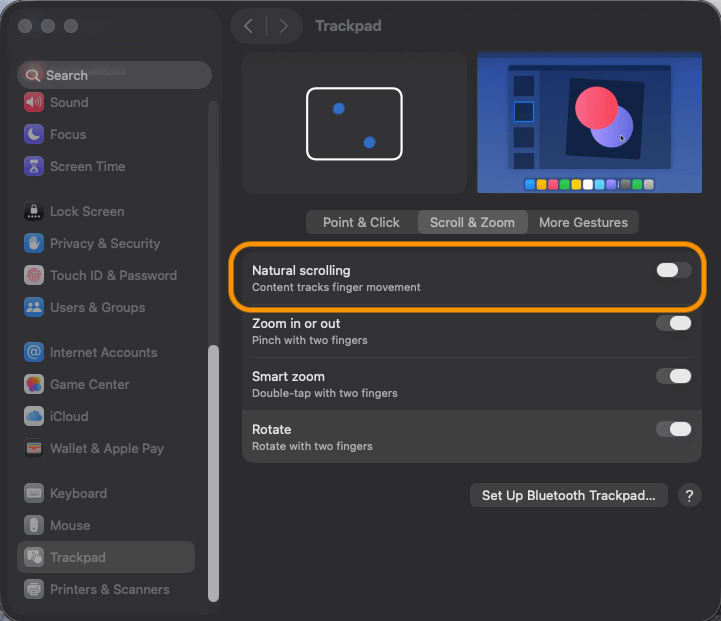
When I use an external mouse for work, I prefer to set the scrolling direction to non-natural. However, when I use the trackpad, I like to have natural scrolling enabled. This habit forces me to frequently go to System Settings -> Trackpad -> Scroll & Zoom -> Natural Scrolling.
How can Apple Script help me quickly toggle the scroll direction?
Writing the Apple Script
- Create a new Apple Script file:
toggle_scroll_direction_tahoe26.applescript
-- Open the Trackpad settings in System Preferences
do shell script "open x-apple.systempreferences:com.apple.Trackpad-Settings.extension"

-- Delay to ensure System Events can interact with UI elements
delay 0.7

-- Begin interacting with System Events
tell application "System Events"
	-- Access the System Settings process
	tell process "System Settings"
		-- Click the second radio button to select a specific tab in the Trackpad settings
		click radio button 2 of tab group 1 of group 1 of group 3 of splitter group 1 of group 1 of window 1

		-- Toggle the "Natural scrolling" checkbox in the Trackpad settings
		click checkbox "Natural scrolling" of group 1 of scroll area 1 of group 1 of group 3 of splitter group 1 of group 1 of window 1

		-- Quit the System Settings application
		tell application "System Settings" to quit
	end tell
end tell
- Run
toggle_scroll_direction_tahoe26.applescriptto test:
osascript toggle_scroll_direction_tahoe26.applescript
Expected: The script should automatically open System Settings -> Trackpad -> Scroll & Zoom -> Natural Scrolling and toggle the scroll direction, allowing you to quickly switch with a single command 🎉
Integrate with Raycast
If you use Raycast, you can integrate the Apple Script as a Script Command, so you can toggle the scroll direction with a shortcut or command 🚀

#!/usr/bin/osascript

# Required parameters:
# @raycast.schemaVersion 1
# @raycast.title Toggle Scroll Direction
# @raycast.mode compact

# Optional parameters:
# @raycast.icon 🤖

# Documentation:
# @raycast.description Toggle Scroll Direction - Quickly switch the natural scrolling setting on your Mac to easily adapt to different usage preferences.
# @raycast.author Camel2243
# @raycast.authorURL https://raycast.com/Camel2243

-- Open the Trackpad settings in System Preferences
do shell script "open x-apple.systempreferences:com.apple.Trackpad-Settings.extension"

-- Delay to ensure System Events can interact with UI elements
delay 0.7

-- Begin interacting with System Events
tell application "System Events"
	-- Access the System Settings process
	tell process "System Settings"
		-- Click the second radio button to select a specific tab in the Trackpad settings
		click radio button 2 of tab group 1 of group 1 of group 3 of splitter group 1 of group 1 of window 1

		-- Toggle the "Natural scrolling" checkbox in the Trackpad settings
		click checkbox "Natural scrolling" of group 1 of scroll area 1 of group 1 of group 3 of splitter group 1 of group 1 of window 1

		-- Quit the System Settings application
		tell application "System Settings" to quit
	end tell
end tell